
You’ve probably tried the standard routine: read your notes, highlight the important bits, read them again the night before a test. It feels like study. It rarely survives contact with an actual exam question.
Here’s the blunt version: rereading is one of the least effective ways to learn Chemistry, and Anki for HSC Chemistry gives you a practical way to schedule retrieval instead. This guide is the step-by-step companion to our ultimate guide to scoring Band 6 in Chemistry, which covers the full syllabus blueprint alongside the study method Anki is built on.
Set it up once, revise for ten minutes a day, and the forgetting curve stops being something that happens to you.
Key Takeaways
- What is Anki? A free, open-source flashcard app that schedules your revision using spaced repetition, so you review each card right before you would forget it.
- Why it works for Chemistry: It combines active recall and spaced repetition, the two strategies most consistently backed by cognitive science research.
- Best feature for HSC Chemistry: Image Occlusion lets you hide parts of diagrams, equations and figures so you test yourself, not just reread.
- Cost: Free on desktop, web and Android. The iPhone/iPad version is a one-off paid app that funds development.
- How to start: Download Anki, install Image Occlusion, screenshot a syllabus figure, hide the labels, and revise daily.
- Want guided help too? Our free HSC resources break down the same science-backed strategies in detail.
How Does Anki Help HSC Chemistry Students?
Anki is not just a digital stack of flashcards. It is a scheduling engine.
Every time you review a card, you rate how easily you recalled it. Anki then decides when to show it again: tomorrow, in four days, in two weeks, or in a few months.
This is spaced repetition. Instead of cramming everything the night before a trial, you review each fact at the exact moment you are about to forget it.
That single mechanism is why we recommend Anki for HSC Chemistry. It fights the forgetting curve for you, automatically.
You can download Anki for free from the official Anki website.
The Science: Spaced Repetition and Active Recall
Two ideas do the heavy lifting here.
Active recall means retrieving information from memory rather than rereading it. Pulling an answer out of your head strengthens the memory far more than passively highlighting notes.
Spaced repetition means spreading those recall attempts out over increasing intervals. Each successful recall tells your brain the information is worth keeping.
Anki delivers both in one loop. You see a question, you answer from memory, and the app spaces the next review based on how well you did.
“Practice testing” and “distributed practice” are the two techniques rated highest in both effectiveness and practicality out of ten common study strategies. Source: Dunlosky, J. et al. (2013), Improving Students’ Learning With Effective Learning Techniques, Psychological Science in the Public Interest.
That’s the peer-reviewed version of active recall and spaced repetition, the same two ideas Anki automates for you. If you’d rather build a full weekly routine around them first, our best study strategies for HSC Chemistry post covers the method end to end.
Our own tutoring method is based on a combination of cognitive science research and the experience of our high achieving tutors, and these are exactly the principles we build into class review and homework.
Why HSC Chemistry Suits Anki So Well
HSC Chemistry is a memory-heavy subject layered on top of conceptual understanding. You need both.
Think about everything you have to keep straight:
- Definitions (enthalpy, equilibrium, Le Chatelier’s principle, Brønsted-Lowry acids and bases)
- Reaction types and conditions for organic pathways
- Colour changes, precipitates and flame test results for qualitative analysis
- Formulae, constants and units
- Labelled diagrams like galvanic cells, titration setups and energy profile graphs
Theory is best broken down into the smallest possible parts, then taught with simple consistent language. Anki cards force exactly that breakdown.
One fact per card. One clear test. No clutter.
Step-by-Step: Using Image Occlusion to Make Chemistry Flashcards
Image Occlusion is the standout feature for a visual subject like Chemistry. It lets you take any figure (a syllabus diagram, a textbook graph, a labelled apparatus) and turn it into a self-test by covering the labels.
Here is how to set it up and use it.
Step 1: Download and Install Anki
Go to apps.ankiweb.net and download the desktop version (Windows, Mac or Linux). It is free.
Create a free AnkiWeb account at the same time so your cards sync across your phone and computer.
Step 2: Add the Image Occlusion Feature
Newer versions of Anki include Image Occlusion built in. If yours does not, open Anki, click Tools > Add-ons > Get Add-ons, and paste the Image Occlusion Enhanced code from the AnkiWeb add-ons page.
Restart Anki after installing.
Step 3: Find a Source of Chemistry Information
Decide what you need to learn and find it in a clear, visual format: a galvanic cell diagram, an organic reaction pathway, a reactivity series, or a slide of definitions.
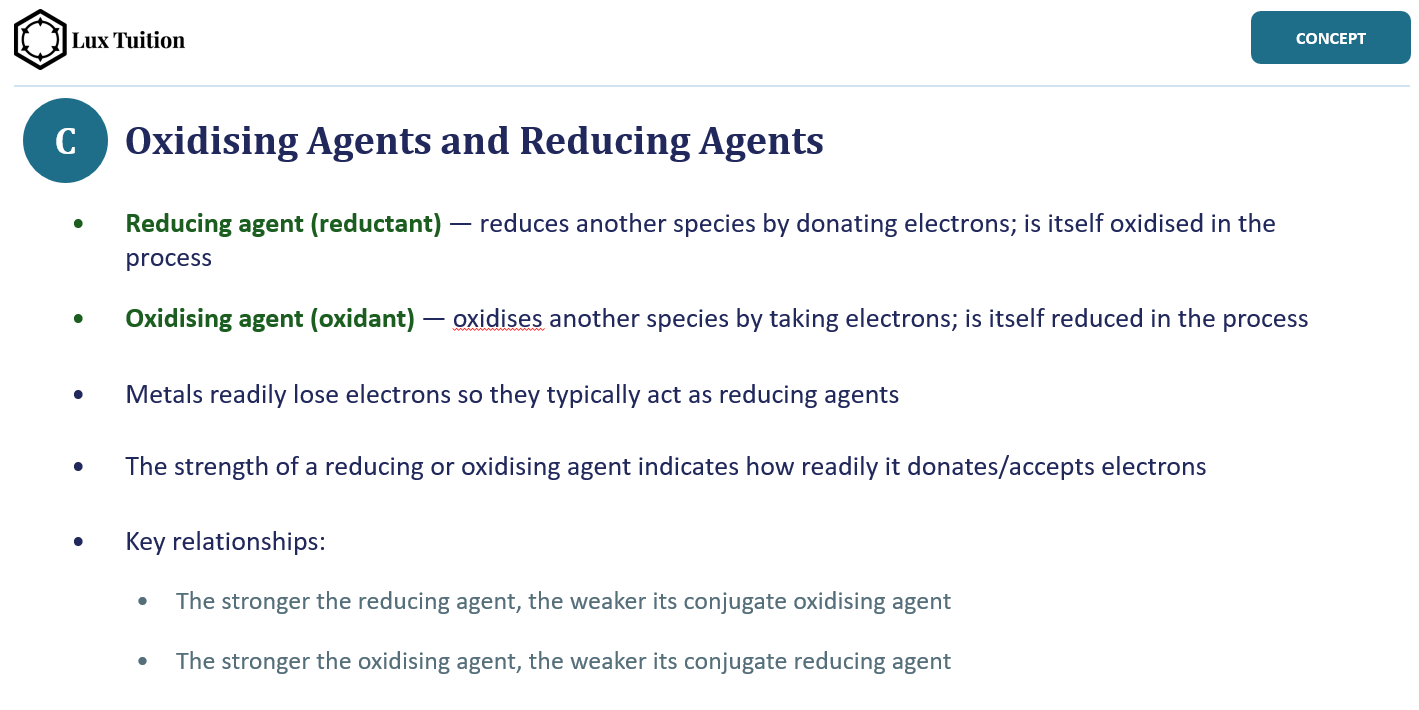
Make sure it comes from a reliable, syllabus-aligned source so you are not memorising something incorrect. If you attend our HSC Chemistry lessons, your lesson slides are built for exactly this: they comprehensively cover every syllabus dot point, one idea at a time, so each slide screenshots straight into Anki as a ready-made flashcard.
Step 4: Create a Deck
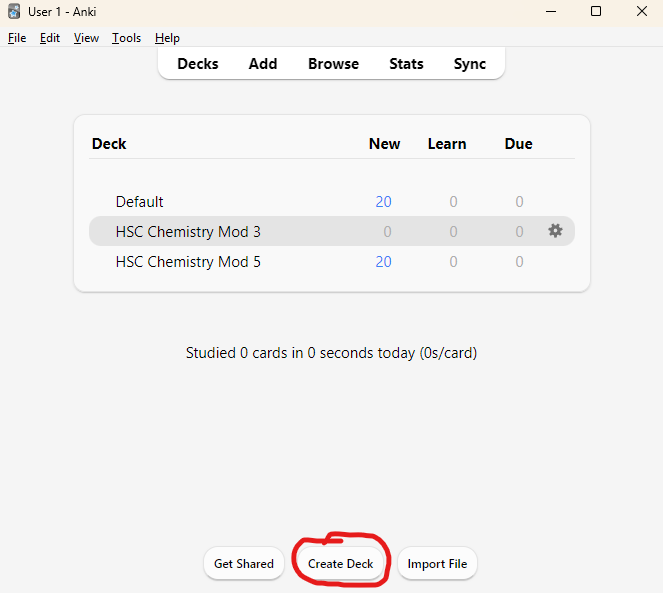
If you have not made one yet, click Create Deck at the bottom of the main Anki window and give it a descriptive name like “HSC Chemistry Module 3” or “Year 11 Chemistry”. Later on, more advanced features like card tags can be used to drill down on a single topic before an assessment.
Step 5: Press the Add Button
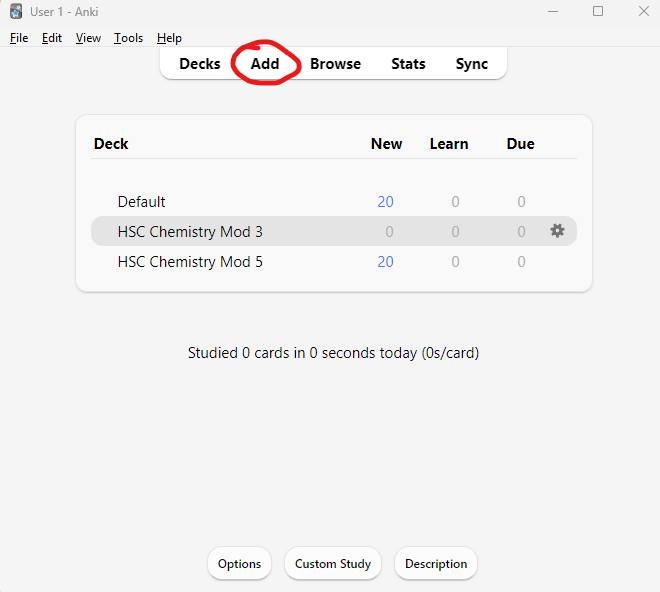
Click Add in the toolbar at the top of the main window. This opens the note editor where every new card starts.
Step 6: Screenshot the Information You Want to Learn
Screenshot the diagram or slide you chose in Step 3. On Windows, press Win + Shift + S to snip a region; on Mac, press Cmd + Shift + 4. The screenshot is copied to your clipboard, ready to paste.
Step 7: Press the Image Occlusion Button
In the note editor, check the deck shown at the top right is the one you just created, then click the Image Occlusion button at the right-hand end of the formatting toolbar and paste in your screenshot.
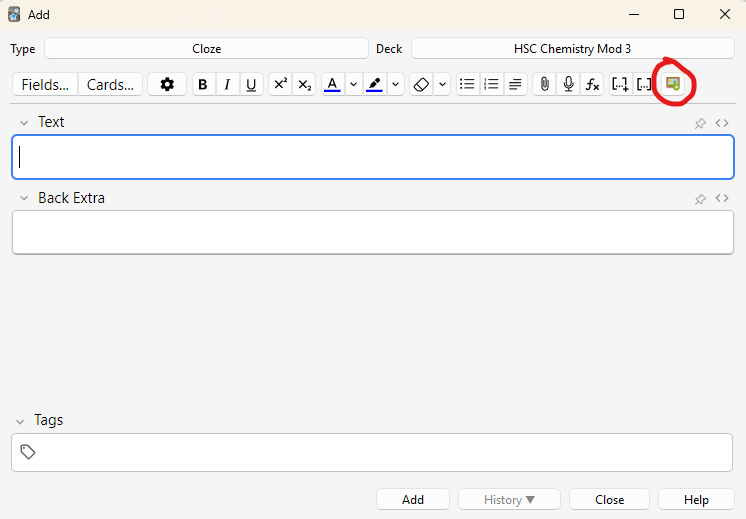
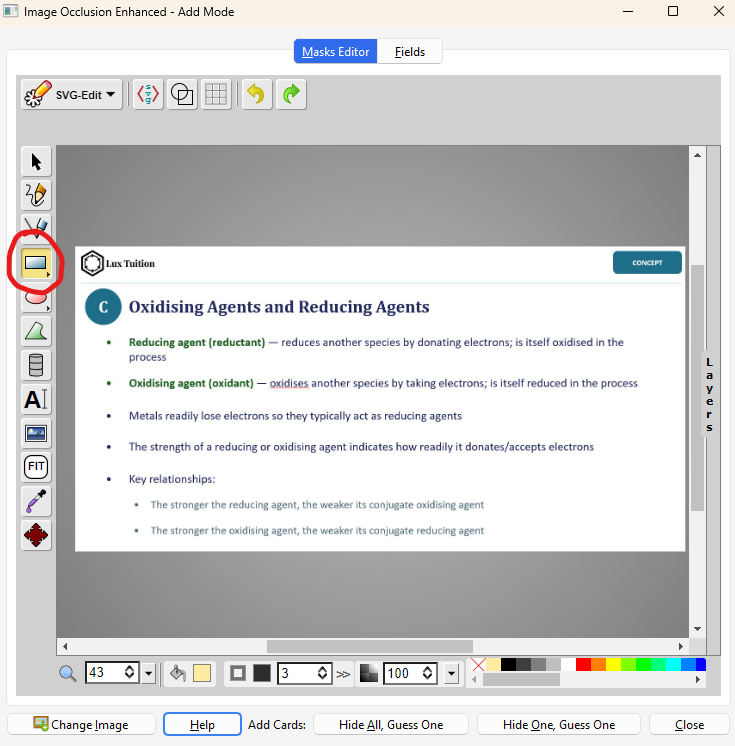
Step 8: Select the Rectangle Tool
The Masks Editor opens with your image loaded. Select the rectangle tool from the toolbar on the left. This is what you will use to draw the boxes that hide information.
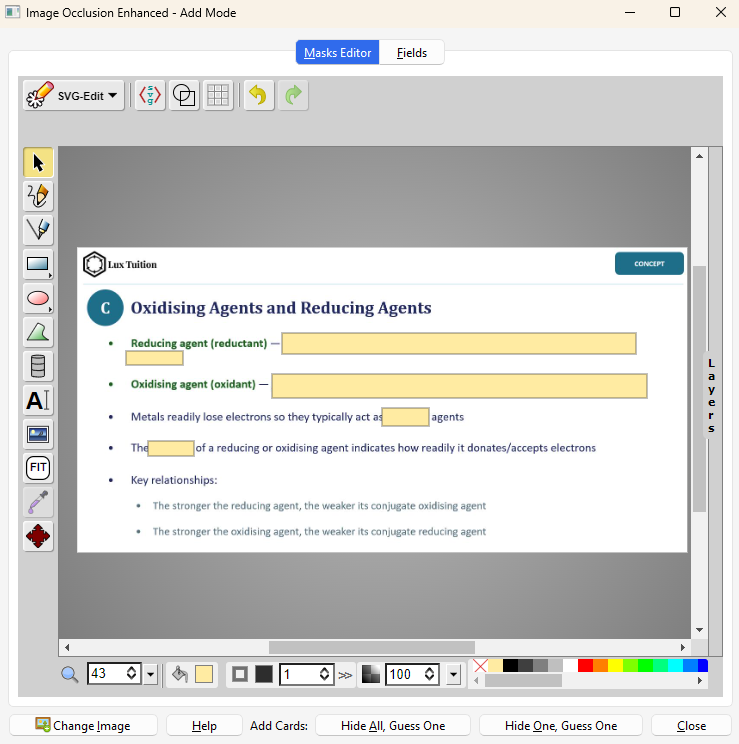
Step 9: Draw Boxes Over the Key Information
Click and drag to cover each piece of information you want to test yourself on: key terms, definitions, values, labels. For a galvanic cell, that means the anode, cathode, salt bridge and direction of electron flow. Each box becomes its own question.
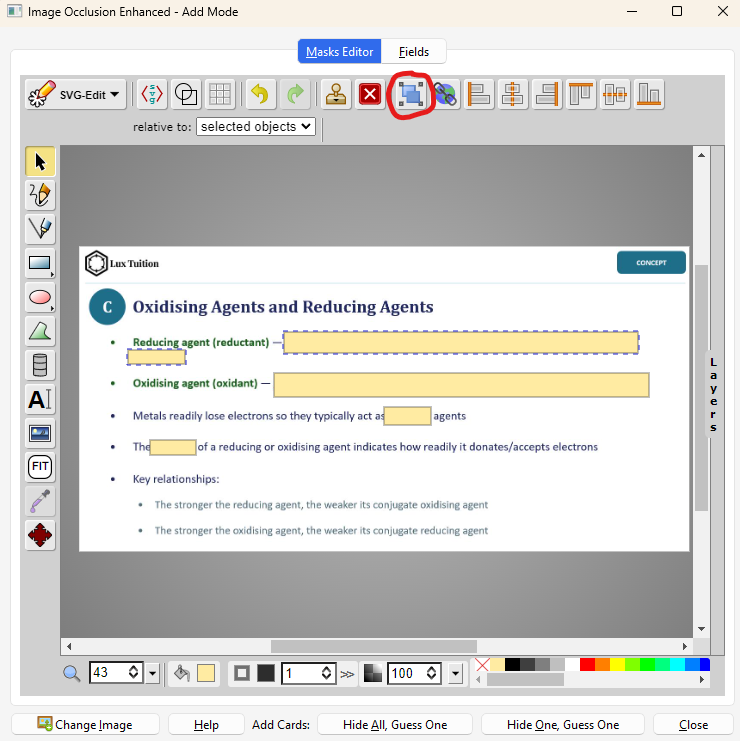
Step 10: Group Boxes That Belong Together
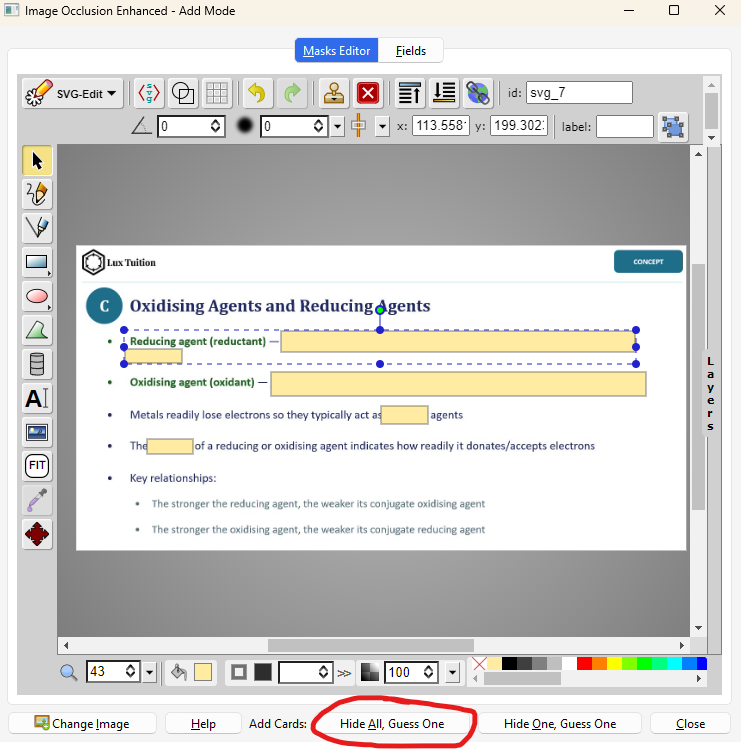
Some answers spill onto a second line, so hiding half of one is pointless. Hold Shift, click each box that should reveal together, then press the group button. Grouped boxes act as a single answer on one card.
Step 11: Generate the Cards
At the bottom of the editor, choose “Hide All, Guess One” to test each label separately with everything else covered, or “Hide One, Guess One” to reveal the rest of the slide as context. Anki instantly generates one card per box, so a single slide becomes ten targeted questions in seconds.
Step 12: Study a Few Minutes Each Day
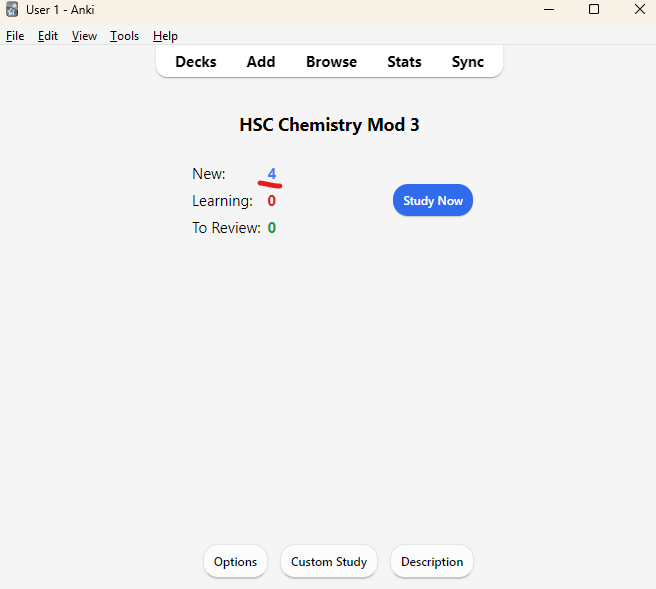
Your new cards appear in the deck, ready to study. Open Anki daily, clear your due cards, and say each answer out loud before revealing it. Rate yourself honestly: Again, Hard, Good or Easy. The app spaces each card accordingly, so the ones you find tricky come back sooner.
Best of all, your cards can be studied from any device with Anki installed, and they sync automatically once you log in with your AnkiWeb account. That honest daily rating is the whole engine. Don’t game it.
Smart Habits to Get the Most From This Free App
The tool is powerful, but how you use it matters. A few rules keep your decks effective.
- Keep cards atomic. One fact per card. “What gas is produced when a metal reacts with dilute acid?” beats a card listing five separate reactions.
- Write your own cards where possible. The act of making a card is itself revision.
- Revise every day. Even ten minutes daily beats a two-hour session once a week. Spaced repetition only works if you show up consistently.
- Tag by module. Use tags like “Module 6 Acid-Base” so you can drill specific topics before a class assessment.
- Phrase cards as questions. Prompts that force a genuine answer trigger active recall. Statements you simply reread do not.
Where Anki Fits With Tutoring and Class Work
Anki is brilliant for retention, but it does not replace building understanding from the ground up. You still need to know why equilibrium shifts before flashcards on Le Chatelier’s principle are useful.
That is the order we follow at Lux. We teach explicitly and build students’ understanding from the ground up, then apply it to exams.
Anki then locks that understanding into long-term memory between sessions. Our HSC Chemistry tutoring at our Blacktown centre, minutes from Blacktown Station, focuses on the deep conceptual understanding first, with practice exams and quizzes aligned to the NSW syllabus.
Think of it as a partnership: we simplify the complex topics, and Anki helps you remember them. You can see how our small classes of 1–5 students work, with sessions from $60 per week (one 1.5-hour class at $40/hour). Curious what a class looks like? Book a free trial with no obligations.
Conclusion
If you take one thing away, let it be this: Anki can help you retain HSC Chemistry, as long as you pair spaced repetition with real understanding.
Download it, build a few Image Occlusion cards from your trickiest diagrams, and revise daily. Stop grinding. Start strategising.
The science is on your side, and so are we.
Frequently Asked Questions
Is Anki really free for HSC students?
Yes. Anki is free on desktop, web and Android. Only the iPhone and iPad version has a one-off cost, and that funds ongoing development.
How long should I spend on Anki each day for HSC Chemistry?
Most students need ten to twenty minutes a day once their decks are established. Short, consistent daily reviews work far better than long weekly cramming, because spaced repetition relies on regular spacing.
What is Image Occlusion and why is it good for Chemistry?
Image Occlusion is an Anki feature that hides parts of a diagram so you recall the labels yourself. It is perfect for Chemistry figures like galvanic cells, titration setups and energy profile graphs, where visual recall matters.
Can Anki replace a Chemistry tutor?
No. Anki is excellent for memory and retention, but it does not build conceptual understanding on its own. We recommend learning the concepts first, then using Anki to retain them between lessons.
When should I start using Anki in the HSC year?
As early as possible. The earlier you start, the more revision intervals Anki can fit in before trials and final exams, so your recall is strongest exactly when it counts.
What kind of cards work best for HSC Chemistry?
Keep them atomic: one fact, one question, one answer. Combine plain question-and-answer cards for definitions with Image Occlusion cards for diagrams and reaction pathways.
Is Anki for HSC Chemistry actually backed by science?
Yes. Anki is built on active recall and spaced repetition, two of the most consistently proven learning strategies in cognitive science research, which is why we build the same principles into our own teaching method.
Learn it properly with a specialist tutor in small Blacktown classes. Enquire about a free trial — no cost, no obligation.
Realistic study tips to help you prepare better for assessments with less stress, plus a printable study planner